Stage 02
1) Stage summary This stage performs a barycentric correction because the time stamps for the observations do not account for HST’s orbital motion.
2) Run PACMAN
Navigate to pacman_run_files and open run_pacman.py.
Comment out Stage 01 and uncomment Stage 02:
# meta = s01.run01(pcf_path=pcf_path)

meta = s02.run02(pcf_path=pcf_path)
Then run:
python run_pacman.py
What happens?
PACMAN reads the most recent stage01/s01_run_* directory and creates a new Stage 02 workdir:
stage02/s02_run_YYYY-MM-DD_HH-MM-SS
Starting s02
Using Stage 01 input directory: /Users/sebastianzieba/Desktop/Projects/Observations/Hubble/GJ1214_13021_2026/stage01/s01_run_2026-05-26_12-41-21
Location of the new Stage 02 run directory: /Users/sebastianzieba/Desktop/Projects/Observations/Hubble/GJ1214_13021_2026/stage02/s02_run_2026-05-26_12-44-31
Converting MJD to BJD: 100%|##########| 2/2 [00:00<00:00,  3.20it/s]
Correcting orbit and visit times to BJD: 100%|##########| 158/158 [00:00<00:00, 735516.13it/s]
Writing t_bjd into filelist.txt
Saving Metadata
Finished s02
After the calculation has been performed, the user can check the newly generated plots saved in:
stage02/s02_run_*/ancil/horizons
Here we show the plot generated for the first of the two visits:
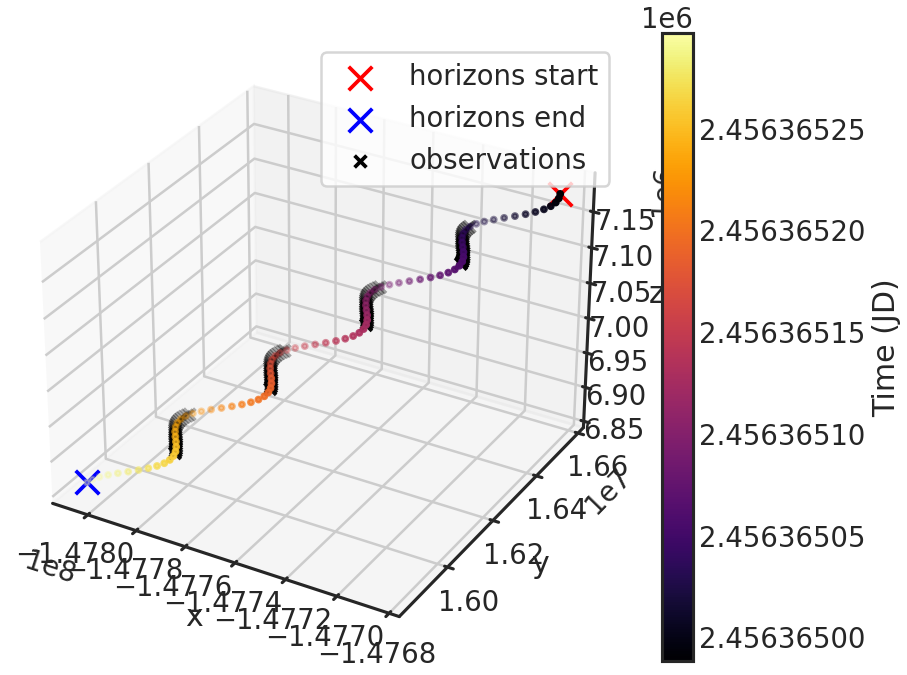
The axis are the distance of HST to the Solar System Barycenter in kilometers.
Horizons start and Horizons end show where our Horizon file starts and ends containing X,Y,Z information.
The black crosses in the plot show the times when HST actually observed. One can see that HST observed 4 orbits in this particular visit (which agrees with the filelist.txt from Stage 00).
One can also see the colored curve is a bit wiggly. This is in fact the rotation of HST around the earth.
The colored curve consists of a lot of points. Each one is an X,Y,Z position of HST downloaded from HORIZONS. The color coding denotes the time direction.
The filelist.txt copied from Stage 01 is updated in this stage and contains a new column called t_bjd with the time of observations in BJD.
E.g. (only showing the first few lines):
================== ===== ====== ====== ======== ================== ================== ================== ==== ========== ==================
         filenames instr ivisit iorbit iexp_orb              t_mjd            t_visit            t_orbit scan        exp              t_bjd
================== ===== ====== ====== ======== ================== ================== ================== ==== ========== ==================
ibxy07p9q_ima.fits F130N      0      0       -1     56364.52973075                0.0                0.0   -1   0.833445  2456365.030605767
ibxy07paq_ima.fits  G141      0      0        0 56364.531017044996 1.8524696677923203 1.8524696677923203    0 103.128586  2456365.031892204
ibxy07pbq_ima.fits  G141      0      0        1 56364.532660565004  4.219395741820335  4.219395741820335    1 103.128586  2456365.033535903
ibxy07pcq_ima.fits  G141      0      0        2    56364.534304085  6.586317792534828  6.586317792534828    0 103.128586 2456365.0351795987
ibxy07pdq_ima.fits  G141      0      0        3      56364.5359476  8.953226432204247  8.953226432204247    1 103.128586 2456365.0368232853
ibxy07pfq_ima.fits  G141      0      0        4 56364.537591119995 11.320137083530426 11.320137083530426    0 103.128586  2456365.038466973
You should now have a directory structure similar to this:
user
└── Desktop
    └── Projects
        └── Observations
            └── Hubble
                └── GJ1214_13021
                    ├── pacman_run_files
                    │   ├── run_pacman.py
                    │   ├── fit_par.txt
                    │   └── obs_par.pcf
                    ├── stage00
                    │   └── s00_run_2022-03-04_15-10-29
                    │       ├── ...
                    ├── stage01
                    │   └── s01_run_2022-03-04_15-10-29
                    │       ├── ...
                    └── stage02
                        └── s02_run_2022-03-04_15-10-29
                            ├── figs
                            │   └── s02_barycorr
                            │       ├── barycorr_horizons_results_v0.png
                            │       └── barycorr_horizons_results_v1.png
                            ├── fit_par.txt
                            ├── obs_par.pcf
                            ├── s02.log
                            ├── WFC3_Meta_Save.dat
                            └── filelist.txt